
For years, Google Search Console has been fairly simple.
You own a website. Google shows you how that website performs in Google Search.
That is starting to change.
Google has recently added two of the biggest changes to Search Console in years:
Platform Properties, which let you track how content from Instagram, TikTok, X and YouTube performs when it appears across Google.
And Generative AI Performance reports, which finally start separating visibility within Google AI Overviews and AI Mode.
The interesting part is not simply that we have a few new graphs to look at.
It is what Google is acknowledging.
Search visibility is no longer confined to your website and a traditional list of blue links. A potential customer might discover your YouTube video, see your Instagram Reel in Google, encounter your website inside an AI Overview, and only visit your business several searches later.
Search Console is beginning to catch up with that reality.
And for businesses that use the new data properly, there are some very useful opportunities.
What has Google actually launched?
There are two separate developments worth understanding.
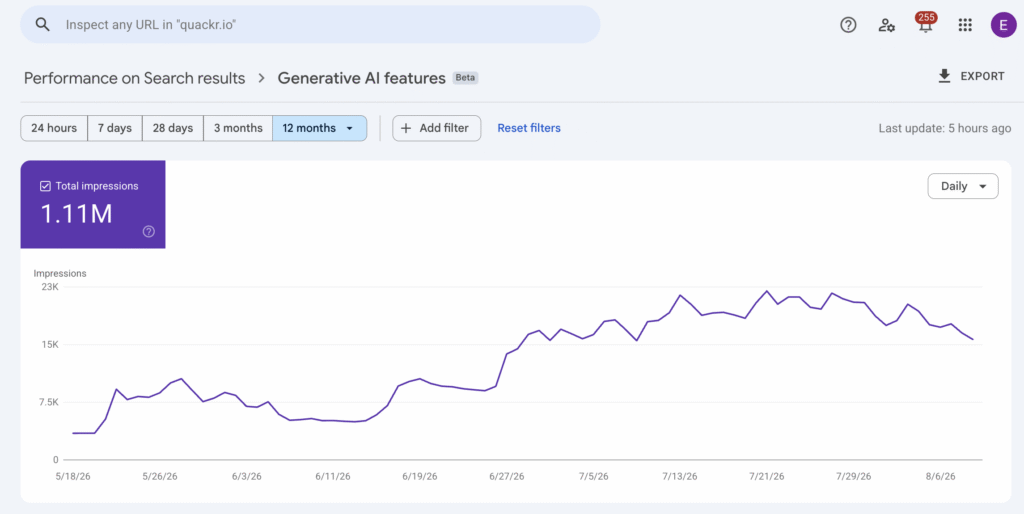
Google introduced its dedicated Generative AI Performance reports on 3 June 2026. These isolate impressions generated within AI experiences including AI Overviews and AI Mode. The reports are still being tested with a subset of Search Console properties rather than being universally available.
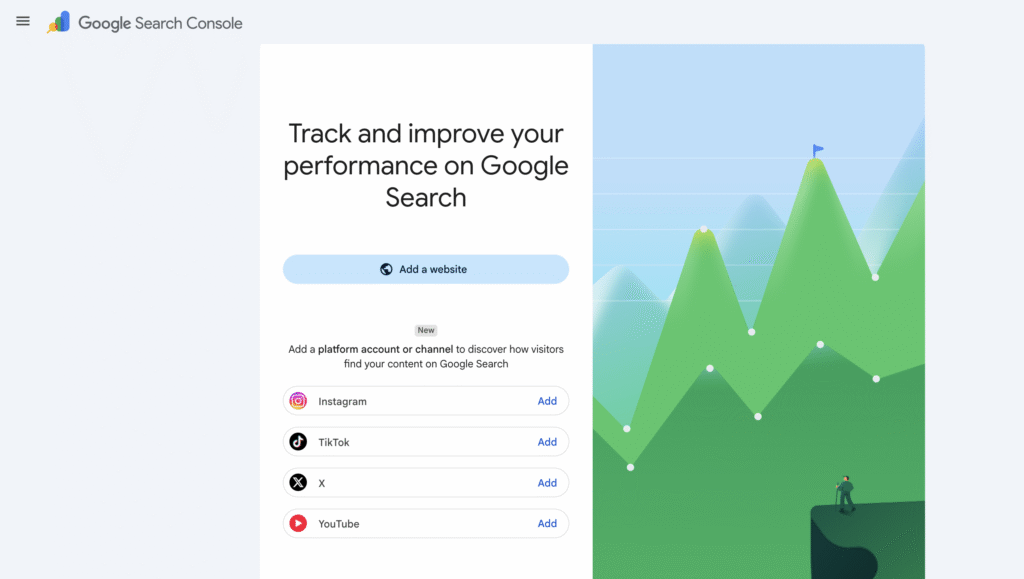
Then came Platform Properties. Google initially launched these during July before confirming on 29 July 2026 that they were available globally. Businesses can now add supported social accounts to Search Console in much the same way they would add a website property.
Currently supported platforms are:
- TikTok
- X
- YouTube
Each account or channel is added as its own Search Console property.
The two features solve very different problems.
Platform Properties help you understand how content hosted away from your website performs in Google.
Generative AI reports help you understand how your website appears inside Google’s AI-generated search experiences.
Used together, they provide a much wider picture of organic visibility than Search Console has historically offered.
1. Search Console Platform Properties: social media is now part of Google SEO reporting
This is probably the more immediately useful of the two updates.
Businesses have known for years that YouTube videos, Reddit threads, TikTok videos, Instagram posts and other third-party content can rank prominently within Google.
The problem was measurement.
Your social team had Instagram Insights. Your SEO team had Search Console. YouTube had its own analytics. Google Search performance sat somewhere between them all.
Platform Properties start joining those dots.
After connecting an Instagram, TikTok, X or YouTube account, Search Console can report clicks, impressions, CTR and average search position for that account’s content when it appears across Google. Where applicable, data can cover Search, Discover and Google News.
More importantly, you can see which individual posts and videos are appearing and which Google searches are finding them.
That is where this becomes useful.
Add your social properties now – even if you are not going to analyse them yet
The first recommendation is very simple.
Connect them.
Search Console does not retrospectively populate all of your previous social search data when you create a Platform Property. Google says new properties only show data from the point collection starts, with reporting normally taking a few days to appear.
So there is little benefit to waiting.
Even if nobody plans to analyse the data until next quarter, adding your accounts now starts building the baseline.
If your company runs three Instagram accounts and two YouTube channels, add each separately.
If you already claimed a Google Search Profile and verified your social accounts through it, Google says those accounts may already have been added automatically.
Find out what people search before discovering your social content
This is probably the biggest opportunity.
Social platforms tell you plenty about what happens inside their ecosystem.
Google Search Console tells you what someone searched before Google showed them your social content.
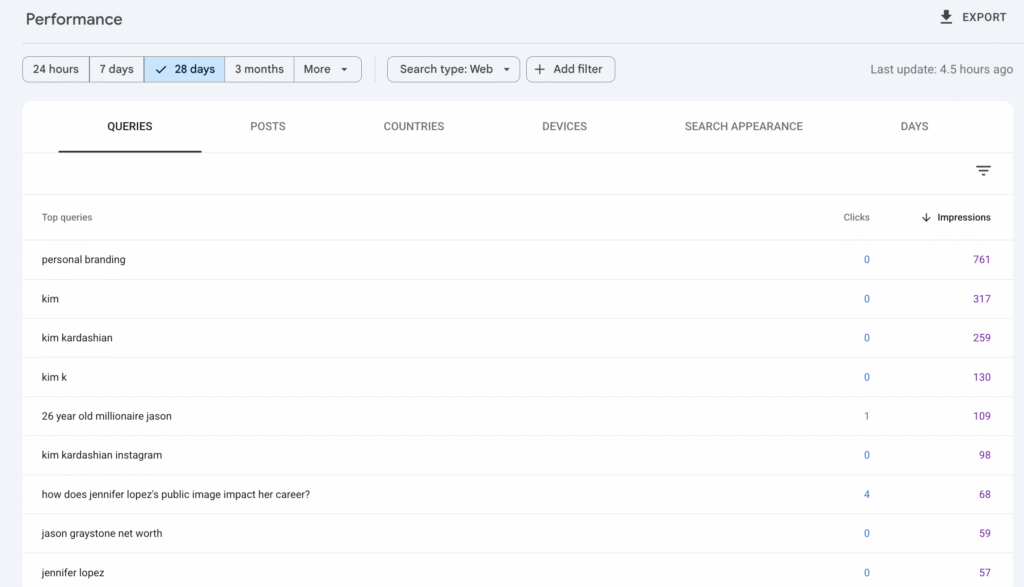
That is a very different piece of information.
Imagine a property developer publishes dozens of Instagram Reels each month.
Instagram might tell them one Reel generated 80,000 views.
Useful.
But Search Console might reveal another Reel with only modest Instagram engagement is repeatedly appearing in Google for searches around:
“best areas to buy property in Dubai for families”
That is commercially far more interesting.
You have discovered a search demand pattern, a content format Google already likes for that subject and a topic that could potentially be expanded into:
an updated Reel, a longer YouTube video, a website guide, an FAQ, an email campaign or supporting content for a service page.
Google’s own guidance specifically recommends using the top, rising and declining query groups within Search Console to influence future topics, titles, captions and even hashtag strategies.
This effectively gives social teams access to a new form of keyword research.
Use social search data as an early content-testing system
One of the best ways businesses can use Platform Properties is to stop treating website and social content calendars as completely separate things.
Suppose your company is considering publishing a detailed guide about a particular problem.
Before spending several days creating it, look at your social Search Console properties.
Have videos or posts around that subject started collecting Google impressions?
Which wording is Google associating with them?
Which questions are generating clicks?
Which version of the subject performs best?
Social content can become a relatively quick way of validating search demand before committing resources to a much larger website asset.
The process also works in reverse.
A website page that is performing strongly for a particular query can inspire short-form content. That social content may then give the brand another opportunity to occupy Google results for the same subject.
Instead of asking whether SEO or social deserves the credit, you start using both to increase your overall share of search visibility.
Compare Reels against posts and Shorts against long-form video
This is one of the features I suspect will be particularly useful for content teams.
Google specifically shows how URL filters can be used to separate:
Instagram /reels/ from /p/ URLs.
And YouTube /shorts/ from /watch URLs.
That means you can compare search performance by format rather than looking at every piece of content as one group.
You might discover that Reels generate plenty of Google impressions but traditional Instagram posts produce a much higher CTR.
Or that Shorts generate visibility for broad informational searches while longer YouTube videos perform for detailed commercial research.
That is useful information when deciding where production budget should go.
It also gives SEO teams something they have often lacked: evidence about which off-site content formats Google actually surfaces for their audience.
Use the 24-hour report to catch trends earlier
Platform Properties work particularly well with Search Console’s recent 24-hour performance view.
Google explicitly recommends monitoring new posts for sudden increases in Google searches and then cross-promoting content that begins gaining traction.
This is useful for businesses operating in industries affected by news, seasonality or sudden demand.
If an older YouTube video suddenly starts receiving impressions again, ask why.
Has legislation changed?
Has a particular product become popular?
Is an event approaching?
Has something happened in the news?
Instead of discovering a trend two weeks later through a monthly report, you potentially have enough information to react while demand is rising.
Google also recommends using Google Trends alongside this data to validate wider search interest.
Bring successful old content back to life
Not every opportunity requires making something new.
An Instagram post from eight months ago might suddenly begin generating Google impressions again.
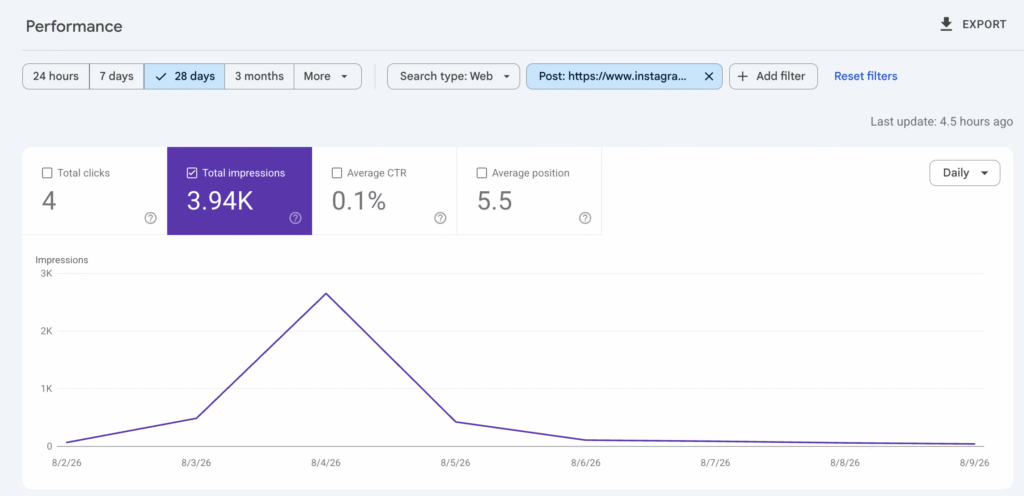
A YouTube tutorial from 2024 might return to the results.
Search Console can surface that resurgence.
You can then:
refresh the caption or title, pin the content, reshare it elsewhere, create an updated version, produce a follow-up, or expand the subject on your website.
Google even recommends using Search Console annotations to mark changes such as updating a YouTube title or TikTok caption, allowing you to see whether search performance changed afterwards.
That turns social optimisation into something considerably more measurable.
Rather than:
“We changed the title because we thought it sounded better.”
You can get closer to:
“We changed the title on 12 August and Google Search impressions increased over the following three weeks.”
Much better.
Compare your search performance across social platforms
Each social account exists as its own property, so Search Console does not currently give you one beautiful combined Instagram + TikTok + YouTube dashboard.
But the data can be exported.
Google explicitly recommends exporting multiple Platform Properties and comparing them side-by-side.
For a business publishing similar content across several channels, this could answer questions such as:
Does Google prefer our YouTube or TikTok content?
Which platform generates the most non-brand visibility?
Does Instagram work particularly well for searches in the UAE while YouTube has more international visibility?
Which platform attracts commercial searches rather than general informational ones?
Are certain subjects consistently better suited to video?
At that point, Platform Properties stop being another reporting tool and start influencing channel strategy.
What Platform Properties do not measure
There is an important limitation here.
Search Console is not replacing Instagram Insights, TikTok Analytics or YouTube Analytics.
Platform Properties only measure how that content performs when surfaced through Google.
An Instagram Reel could receive one million views through Instagram itself and virtually no Search Console impressions.
Equally, a relatively small YouTube video might continually generate traffic from valuable Google searches for years.
Those are two different forms of performance.
Google is very clear that Platform Properties report Google visibility, not exposure within the social platforms themselves.
Businesses should therefore layer this data alongside native social analytics rather than replacing them.
2. Google Search Console’s new AI Visibility reports
Now for the update SEO teams have been asking Google for since AI Overviews first began appearing.
Actual AI-specific reporting. Sort of.
Google’s new Generative AI Performance report gives website owners a dedicated view of impressions generated through AI Overviews and AI Mode.
There is also a separate Generative AI Performance report for Google Discover.
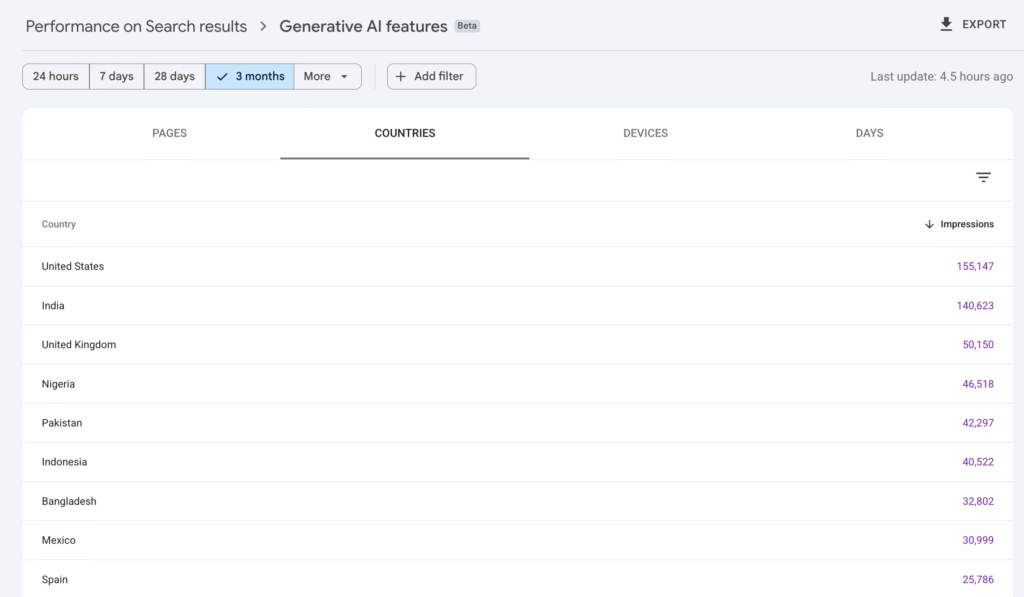
For Search, you can break AI impressions down by:
Page
Country
Device
Date
You can also monitor changes over time and export the data for further analysis.
That may not sound revolutionary.
But until now, AI Overview and AI Mode performance was mixed into broader Search Console reporting.
Having a first-party Google view specifically showing which pages are receiving AI exposure is an important step.
There is one fairly large catch
The dedicated AI report currently reports impressions.
Not AI clicks.
Not AI CTR.
Not AI-specific average position.
And, perhaps most frustratingly, not the queries that triggered those AI impressions.
So if a page received 25,000 AI impressions last month, Search Console currently cannot tell you:
what people asked, how many people clicked your result from those AI experiences, what your AI CTR was, or exactly where your source appeared within the generated answer.
Google has said it is considering additional metrics over time, so this is clearly unlikely to be the finished product.
For now, however, businesses need to understand what the report can and cannot prove.
Do not treat an AI impression as a visit
This sounds obvious, but it is an important reporting distinction.
An AI impression means a link to your site was shown to somebody within an eligible Google generative-AI experience.
It does not mean they clicked.
And because the normal Search Performance report still mixes AI traffic into overall Web performance, you cannot simply take the dedicated AI impression number and divide it by total Search Console clicks to manufacture an “AI CTR”.
The numbers are not like-for-like. Google’s standard Performance data includes AI feature activity alongside conventional web results, while the new dedicated report isolates AI impressions.
Avoid creating a metric that looks impressive in Looker Studio but does not actually mean anything.
We have enough of those already.
Establish an AI visibility baseline
The first useful thing to do is much simpler.
Record where you are now.
Export your AI Performance data and establish:
total AI impressions, pages receiving AI visibility, highest-impression pages, countries generating visibility, device split and changes over time.
Then group URLs by meaningful page type.
For example:
Service pages
Product/category pages
Guides
Blog content
Comparison pages
Location pages
Case studies
That immediately makes the report more useful.
Knowing /blog/article-347/ received 5,000 AI impressions is mildly interesting.
Knowing case studies have 4x the AI visibility of generic informational blogs despite representing only 10% of published content is a strategy insight.
The second tells you something about the type of evidence and content Google may currently be choosing to surface from your website.
Find the pages Google already trusts within AI results
Sort your URLs by generative-AI impressions.
Your strongest pages deserve investigation.
What makes them different?
Do they contain first-hand experience?
Original data?
Expert commentary?
Clear explanations?
Useful comparison tables?
Strong supporting imagery?
Unique examples?
Are they already strong traditional organic performers?
Are other websites referencing them?
Do they answer a topic significantly better than your competing pages?
You are looking for repeatable characteristics.
Then do the opposite.
Take important pages receiving little or no AI visibility and compare them with your winners.
The report will not tell you the answer directly.
It gives you the dataset required to start forming much better hypotheses.
Look at AI visibility by market
The country dimension is particularly useful for international businesses.
A UAE company might discover strong AI visibility in the UK but almost none in the UAE.
An ecommerce website might appear frequently within US AI Mode but struggle across European markets.
A multinational could compare which regional content hubs are being selected most frequently.
That can help expose issues around localisation, language, regional authority and content depth.
Again, impressions are not revenue.
But they provide a useful leading indicator of where Google’s generative systems are and are not finding your website relevant.
Compare AI visibility before and after meaningful changes
This is where the data becomes useful for GEO testing.
If you materially improve a page, record the date.
Perhaps you add:
first-party research, expert quotes, clearer product comparisons, original imagery, better supporting evidence, first-hand examples, improved internal linking or a significantly better answer to the core question.
Then monitor generative-AI impressions over the following period.
The goal is not to make ten tiny changes and claim whichever one preceded an increase was responsible.
SEO does not work like that.
Instead, use batches of meaningful improvements and look for directional evidence across multiple pages.
Over time, you can begin establishing which types of improvements correlate with stronger AI visibility for your particular website.
That is considerably more useful than copying somebody’s universal “GEO checklist” from LinkedIn.
3. What should businesses actually do to improve Google AI visibility?
Conveniently, Google has also published considerably more detailed guidance around this.
And some of it may disappoint anyone trying to sell a secret 97-point AI optimisation framework.
Google says its generative AI features remain rooted in its existing Search ranking and quality systems.
AI Mode and AI Overviews use techniques including retrieval-augmented generation and query fan-out, where Google’s systems can generate multiple related searches to gather the information needed to answer a broader question.
That changes how content can be discovered.
But Google’s advice remains remarkably sensible.
Create content that adds something the internet does not already have
This is probably the biggest point.
Google’s latest generative-AI guidance explicitly recommends unique, non-commodity content.
First-hand experiences.
Original viewpoints.
Actual expertise.
Useful evidence.
Information that has not simply been summarised from the first five existing search results.
Think:
Weak: “7 Benefits of Hiring an Accountant”
versus:
Stronger: “We Reviewed 83 SME Accounts in Dubai: The 6 Bookkeeping Mistakes We Found Most Often”
One could have been written by virtually anyone.
The other contains something worth retrieving.
This has always been good content marketing.
AI search simply makes the difference between genuine information gain and recycled content increasingly important.
Make sure Google can actually access and understand the page
GEO does not make technical SEO disappear.
Google says pages still need to be indexed, eligible to appear with a Search snippet and crawlable to participate in its generative Search experiences.
Internal linking still matters.
Indexability still matters.
JavaScript rendering can still matter.
Clear site architecture still matters.
Keeping important information as accessible text still matters.
The exciting AI strategy can very quickly become irrelevant when the page you want Google to cite is canonicalised to the wrong URL.
Do not create hundreds of pages for imaginary AI prompts
Query fan-out does not mean businesses should create a separate article for every variation of a possible AI question.
Google explicitly warns against doing this at scale purely to manipulate Search or generative responses. Its systems are designed to understand relevance without requiring the exact same wording as every possible search.
Build topic depth.
Do not build 400 near-identical URLs.
There is a difference.
Ignore most of the supposed Google AI hacks
Google’s latest documentation is unusually explicit about several popular GEO recommendations.
For Google Search specifically, you do not need:
an llms.txt file, special AI schema, artificially “chunked” paragraphs, content rewritten in some magical AI-friendly writing style, or fake mentions created across the web.
Google says llms.txt neither helps nor harms Google Search visibility, there is no special structured-data markup required for AI Mode or AI Overviews, and content does not need to be rewritten purely for generative AI systems.
That does not mean GEO as a wider discipline is pointless.
ChatGPT, Perplexity, Gemini, Claude and Google do not all operate identically.
But when we are specifically talking about Google AI visibility, businesses should be careful not to mistake a new acronym for an entirely new set of fundamentals.
4. Google has also added an AI inclusion control
There is another important Search Console update sitting alongside the reporting feature.
Eligible Search Console owners are starting to see a Search generative AI control under Settings.
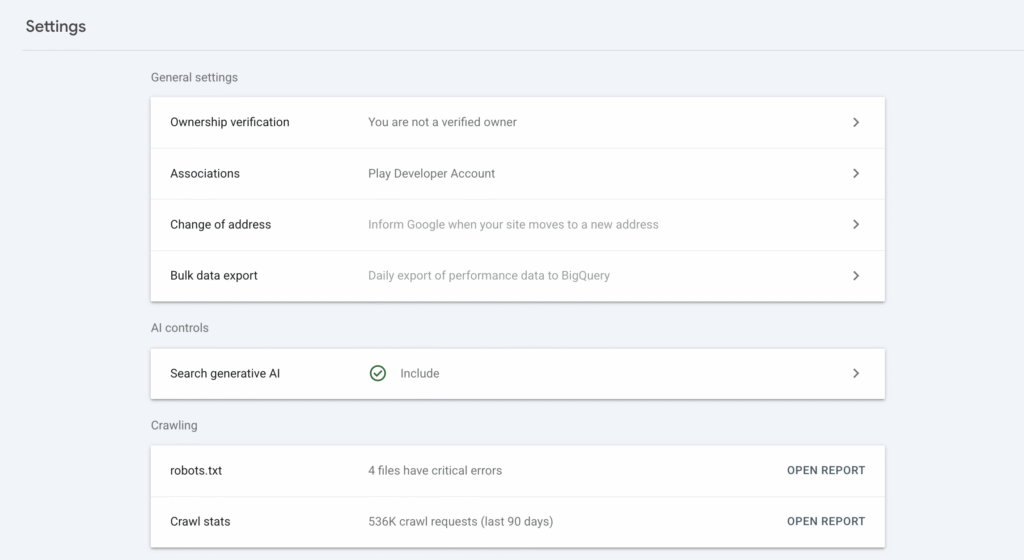
By default, websites are included.
Businesses can now choose to prevent their website’s links and content from appearing in and being used to ground Google’s applicable generative Search features, including AI Overviews, AI Mode and generative-AI experiences within Discover.
This control is also still being rolled out rather than being available to every website.
Should businesses turn AI visibility off?
For most businesses trying to grow organic visibility?
Probably not.
Excluding your website means giving up both visibility and potential traffic from those experiences.
There may be legitimate reasons for publishers, rights holders or businesses with particular content-licensing concerns to make a different decision.
But a company trying to increase leads, product discovery or brand visibility would need a compelling commercial reason to voluntarily remove itself from a growing area of Google Search.
Importantly, Google says this setting does not affect rankings or inclusion elsewhere in normal Search.
It is also separate from Google’s AI-training controls. Google’s Google-Extended control deals with model training; the new Search Console setting determines participation within applicable generative Search experiences.
Do not confuse the two.
5. The bigger opportunity: stop measuring SEO, social and AI as separate worlds
This is where these updates get more interesting.
Search behaviour has fragmented.
Someone researching a new CRM might:
search Google, watch a YouTube comparison, see a Reddit discussion, encounter an AI Overview, visit two supplier websites, return through a branded search and eventually request a demo.
Trying to assign the entire journey to one channel misses what actually happened.
Search Console’s new features give businesses an opportunity to build a much more connected content system.
Your website Search Console property shows which subjects generate traditional organic demand.
Your Instagram, TikTok, X and YouTube properties show which off-site content Google chooses to surface.
Your Generative AI report shows which website pages Google’s AI experiences are using strongly enough to generate visibility.
Your native social analytics show what people engage with once they are on those platforms.
Your analytics and CRM then tell you which activity eventually contributes to enquiries and revenue.
Those datasets should start informing each other.
A question generating impressions for a TikTok video could become a website article.
That article could generate AI visibility.
The strongest section could become a YouTube Short.
Search Console could then show whether that Short begins appearing for another cluster of searches.
The resulting data could uncover a commercial query worth building into the relevant service page.
That is a much better content loop than:
“We need four blogs and twelve social posts this month because that is what the content calendar says.”
6. A practical Search Console workflow for businesses
If I were setting this up for a business today, I would keep the process fairly simple.
First, connect every relevant Platform Property now. There is no benefit to losing another month of social search data.
Second, establish a baseline. Export the first useful 28-day period for Instagram, TikTok, X and YouTube alongside your standard website performance.
Third, review social search queries monthly. Look specifically for unexpected searches, rapidly growing query groups and commercially relevant themes.
Fourth, compare formats. Separate Reels from standard Instagram posts and Shorts from long-form YouTube content.
Fifth, use the 24-hour report for reactive content. This is particularly useful for news, events, seasonal products, fashion, travel, hospitality and other trend-sensitive sectors.
Sixth, benchmark generative-AI impressions if the report is available to you. Group pages by page type rather than simply looking at individual URLs.
Seventh, identify your AI winners. Work out what they contain that weaker pages do not.
Eighth, annotate major changes. If a YouTube title, TikTok caption or important website page is substantially changed, mark the date so performance can be reviewed properly afterwards.
Finally, report the commercial story. Do not present a 40% increase in AI impressions as though it is automatically a 40% increase in business performance. Connect visibility to traffic, enquiries, assisted conversions and revenue wherever the data allows.
That final part matters.
More visibility is useful.
More visibility from the right audience is considerably better.
Is this the beginning of proper AI search reporting?
Yes.
But we are not there yet.
Google finally separating generative-AI impressions is a major improvement, particularly because the data comes directly from Google rather than being estimated by a third-party visibility tracker.
But the missing query and click data leaves a very large hole.
A business can now know that a service page received 50,000 AI impressions.
It still cannot use the dedicated report to see the questions responsible for those impressions or exactly how much traffic those appearances generated.
Google has already said it is considering additional metrics, so I would expect the usefulness of this report to increase considerably if reporting expands.
Platform Properties are arguably further along.
Being able to see exactly which searches surface your social and video content creates immediate opportunities for keyword research, content planning, repurposing, format testing and cross-platform reporting.
And taken together, the two releases say something bigger about where Google is heading.
Search Console is gradually becoming less of a website SEO tool and more of a Google visibility tool.
Your website still matters enormously.
But your visibility can now come from your website, your videos, your social posts, AI-generated answers, Discover and increasingly rich search-result formats.
Businesses that continue measuring each of those in isolation will miss a large part of the picture.
The better approach is to understand which questions your audience is asking, where Google chooses to surface your brand in response, and how those touchpoints eventually contribute to commercial outcomes.
Because ultimately, another graph in Search Console is not the benefit.
Knowing what to do with it is.