
Most SEOs treat title tags and meta descriptions as an afterthought. Something you fill in before publishing, a quick keyword drop and a pipe separator, and move on.
That’s a mistake that costs you clicks every single day.
Your title tag and meta description are your organic ad copy. They’re the only thing standing between a user seeing your result and clicking on someone else’s.
They kind of act like your shop window – before a potential customer has interacted with your brand or even knows who you are, this is what convinces them to look further into your brand.
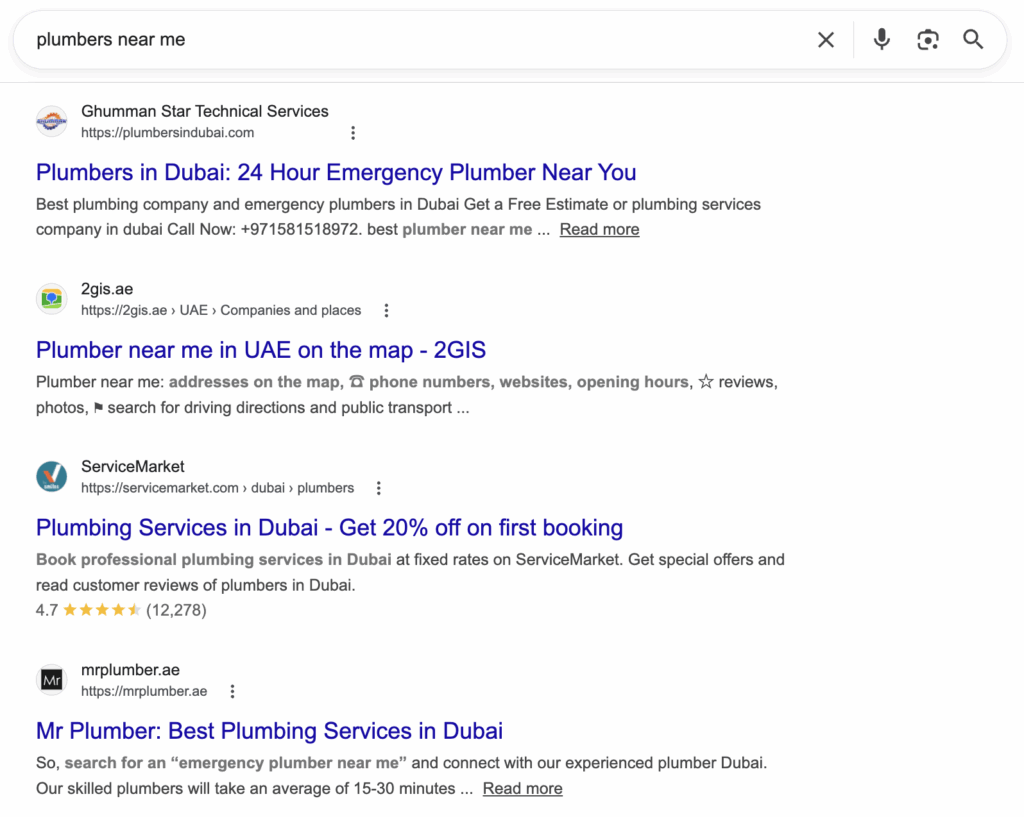
Getting them right is one of the highest-leverage, lowest-cost improvements you can make to your SEO, and most sites do it badly.
This guide covers everything: the technical rules, the psychology of what drives clicks, how RankBrain uses your CTR data against you, why emojis and special characters can lift performance, and a precise framework for auditing the titles you already have.
What Google actually does with your title tag
Let’s start with something that trips people up. Writing a title tag does not guarantee Google will show it.
Google rewrites title tags constantly. According to Semrush’s research, it happens in over 60% of cases. The rewrites usually happen for one of a few reasons: your title doesn’t match the actual content of the page well, it’s stuffed with keywords rather than written for humans, or it’s so short Google doesn’t trust it to represent the page accurately.
Google uses the H1, on-page headings, and anchor text pointing to the page as inputs for what it thinks your title should be.
The practical implication is this: write your title tag for humans first. If it’s accurate, specific, and relevant to the page content, Google is much less likely to override it.
The technical baseline: pixel width, not character count
You’ll see people throw around “60 characters” as the maximum length for a title tag. That number is a rough approximation. Google actually measures titles in pixels, not characters, because different letters take up different amounts of horizontal space.
The display limit on the desktop is roughly 600 pixels. In practical terms, most titles stay safe between 50 and 60 characters, but an uppercase-heavy title at 55 characters might still get truncated, while a lowercase 62-character title displays fine.
This is where tools matter. Mangools SERP Simulator (and its free equivalent at portent.com/serp-preview-tool) lets you paste your title and description and see a real preview of how it renders in search results before you publish anything.
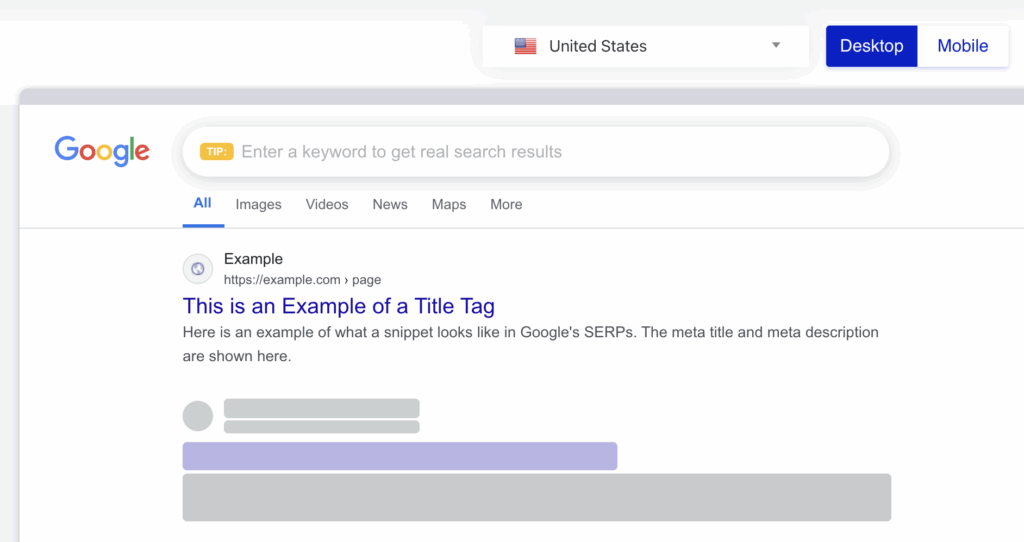
Use it. It takes 30 seconds and removes all the guesswork.
That said, don’t let pixel width drive every decision. A title that’s compelling at 65 characters will outperform a tepid one at 58. The rendering limit is a constraint, not a goal.
Writing title tags that drive clicks
The job of a title tag is to make someone choose your result over the nine others on the page. This is how you can do that:
Lead with the keyword, but don’t stop there
Google bolds the words in your title that match the search query. That visual signal matters. Put your target keyword near the front of the title so it catches the eye. But after that, you have space to say something useful. “SEO Agency Dubai” is the title. “SEO Agency Dubai: We Focus on Revenue, Not Rankings” is a reason to click.
Match the intent of the query, not just the topic
Someone searching “how to write meta descriptions” wants a guide. Someone searching “meta description examples” wants to see examples. Another person searching “meta description length 2026” wants a quick answer and probably suspects something changed. Your title should signal that you’re giving them exactly what they came for. Misaligning with intent is the fastest way to get a click and a bounce, which poisons your CTR data over time.
Be specific
Vague titles get skipped. “A Complete Guide to SEO” tells someone nothing. “How to Write Title Tags That Google Won’t Rewrite” tells them precisely what they’ll walk away knowing. Specificity is a proxy for expertise, and users respond to it.
Use numbers where they’re natural
Numbered titles perform well for informational content, not because of some magical formula but because they signal a clear structure. “7 Title Tag Mistakes Killing Your CTR” is more clickable than “Title Tag Mistakes to Avoid” because the reader knows what they’re getting into.
On brand in the title: usually no
A lot of sites reflexively append ” | Brand Name” to every title. In many cases that’s just burning pixel space. Unless your brand name is a genuine trust signal for the query (think Shopify’s documentation, Moz’s beginner guides), leave it off commercial and informational pages. The exception is your homepage. Brand belongs there.
How RankBrain factors CTR into your rankings
This is the part most guides skip over, and it’s important.
RankBrain is Google’s machine learning component that, among other things, uses engagement signals to calibrate rankings. CTR is one of those signals. If users consistently skip your result in favour of others and then don’t come back to the search results page (a signal called “pogo-sticking”), Google learns that your result wasn’t satisfying for that query and adjusts your position accordingly.
The reverse is also true. A page ranking in position four that earns a disproportionately high CTR relative to its position gets noticed. Google will test it higher. You can earn ranking improvements without a single new backlink, just by making your snippet more compelling than the pages above you.
This is why CTR isn’t just a vanity metric to track in Search Console. It’s a ranking input. Which means every poorly written title tag is a quiet drag on your position, not just your traffic.
Writing meta descriptions that actually work
Meta descriptions are not a ranking factor. Google confirmed this years ago. They don’t directly influence where you rank.
They do, however, directly influence whether someone clicks. And as we just covered, clicks influence rankings. So the indirect effect of a good meta description on your rankings is very real.
Google will also frequently replace your meta description with a snippet pulled from your page content that it thinks is more relevant to the query.
This happens more often for informational queries where Google finds a specific passage that answers the question. You can reduce the chance of this by writing descriptions that are clearly relevant and answer the implied question in the search.
The practical rules for meta descriptions
Keep them between 140 and 160 characters. Google cuts off at roughly that point on desktop (slightly shorter on mobile, around 130). Don’t write 80 characters and call it done. You have space to persuade someone.
Write them as a call to action, not a summary. “This guide explains how to write title tags for SEO” is a summary. “Stop guessing how long your title tag should be. Here’s how to write and audit them properly.” is a reason to click. The difference is voice and intent.
Include your keyword naturally. Google bolds matching words in the description too. If your target keyword appears in the description, it stands out visually in the SERP. Don’t contort the prose to fit it in awkwardly, but include it.
Make a specific promise. Users click when they believe the page will give them something valuable. The more specific that promise, the more confidence they have before clicking. “Learn about SEO” promises nothing. “The exact framework we used to improve CTR by 34% across 200 URLs” promises something specific and auditable.
Emojis and special characters: do they actually help?
Yes, in the right contexts.
Emojis and special characters (stars ★, arrows ▶, checkmarks ✓, fire 🔥) render in search results and can meaningfully improve CTR, particularly for pages in competitive SERPs where every result looks identical.
The mechanic is simple: pattern interruption. When nine results are plain text and yours has a ⭐ or a relevant emoji, the eye is drawn to it. If the rest of the snippet is strong, that attention converts to clicks.
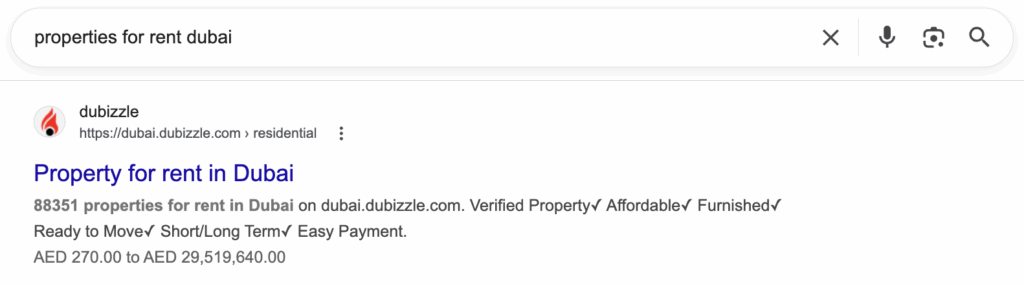
A few things to know before you go emoji-happy across your entire site:
Google can and does strip emojis it considers irrelevant or spammy. If you add a 🚀 to every page regardless of context, you’ll likely see it removed. Use emojis where they’re contextually appropriate and add meaning, not just visual decoration.
They work better for some query types than others. Informational content, product pages, and local listings tend to benefit most. For highly authoritative or brand-sensitive queries (financial services, legal, medical), emojis can actually signal the wrong tone and hurt trust.
Test before assuming. Add emojis or special characters to a handful of pages, wait three to four weeks, and check the CTR change in Search Console for those URLs. Don’t assume it worked.
The CTR-led audit framework: how to decide which titles to rewrite
Here’s where most SEO audits get it wrong. They export a list of titles flagged as “too short” or “too long” by a crawl tool, hand it to a copywriter, and call it an audit. That approach ignores whether those titles are actually underperforming.
The correct approach ties rewrite decisions to CTR data. This is the exact workflow to follow.
Step 1: Export your full list of URLs and title tags from your crawler (Screaming Frog, Ahrefs, Semrush). Filter for titles that are flagged as too short (under roughly 30 characters) or too long (over roughly 65 characters). Export that into a Google Sheet.
Step 2: In a separate tab in the same spreadsheet, paste your exported Google Search Console performance data. Use the last 16 months of data if available. You want URL, impressions, clicks, CTR, and average position.
Step 3: In a column next to your title tags list, use VLOOKUP to pull the CTR for each URL:
=IFERROR(VLOOKUP(A2,’GSC Click Data’!$A$1:$DM$32460,4,FALSE),”-“)
Name your GSC tab exactly “GSC Click Data” for that formula to work. Format the CTR column as a percentage.
Step 4: Apply conditional formatting to the CTR column:
- Below 1%: red
- 1% to 3%: orange
- 3% and above: green
Step 5: Add a filter to the first row, then duplicate the sheet. On the duplicate, filter the CTR column to show only sub-1% results. That’s your rewrite priority list. Not the pages with the longest or shortest titles. The pages with the worst click-through performance relative to impressions.
What to actually rewrite them to:
Each rewritten title should do three things. It should convey a clear, specific offering. It should include an exact or partial match to one GSC query driving impressions to that URL. And it should be written for a person making a decision in a search result, not for a crawler evaluating keyword presence.
In most cases, one targeted query variant is enough. You don’t need to cram three keywords into a 60-character title. Pick the one with the highest impression volume and write around that.
A note on title tag length decisions
Audits that tell you to “shorten your title tag because it’s over 60 characters” without looking at CTR first are giving you bad advice. A 65-character title with a 7% CTR is working. Shortening it risks breaking something that isn’t broken.
The same logic applies in reverse. A 28-character title that’s getting a 0.4% CTR with 4,000 impressions per month is leaving serious traffic on the table.
Expanding it with a specific value proposition is one of the higher-return quick wins you’ll find in a technical audit.
Let CTR data drive the decision. Always.
Page title & meta description checklist
Title tags:
- Target keyword near the front
- 50 to 60 characters as a general range (check pixel width in Mangools or a SERP simulator)
- Matches the intent of the primary query
- Specific enough to distinguish from competing results
- Brand name included on homepage; usually omitted elsewhere
- Preview it in a SERP simulator before publishing
Meta descriptions:
- 140 to 160 characters
- Includes the target keyword naturally
- Written as a prompt to act, not a summary
- Makes a specific, believable promise
- Different on every page (duplicate descriptions are a wasted opportunity)
For auditing:
- Tie rewrite decisions to CTR, not just length flags
- Use the GSC VLOOKUP workflow above
- Test emojis and special characters on informational and product pages in competitive SERPs
- Review what Google has rewritten your titles to, as that data tells you a lot about how Google is interpreting your page
Titles and descriptions are the first and sometimes only touchpoint a potential customer has with your site before they decide whether to trust you enough to click. Most sites treat them like admin.
Treat them like copy, because that’s exactly what they are.
If you want us to run a CTR audit across your existing pages and identify the highest-impact rewrites, that’s part of what we do. Book a consultation here.